
Owner-grade financials, without QuickBooks
Meridian computes a balance sheet, a tax-ready P&L, and a Schedule E worksheet straight from the records you already keep — rent, expenses, loans, deposits. It is the statement package your CPA and your lender ask for, sitting on top of the day-to-day tracking that produced it.
Financial reports
Real statements, computed from your records
No chart of accounts, no journal entries, no bookkeeper. Every figure traces back to a transaction you logged, a loan you entered, or a depreciation schedule — and every judgment call is labeled on the page instead of buried in a formula.
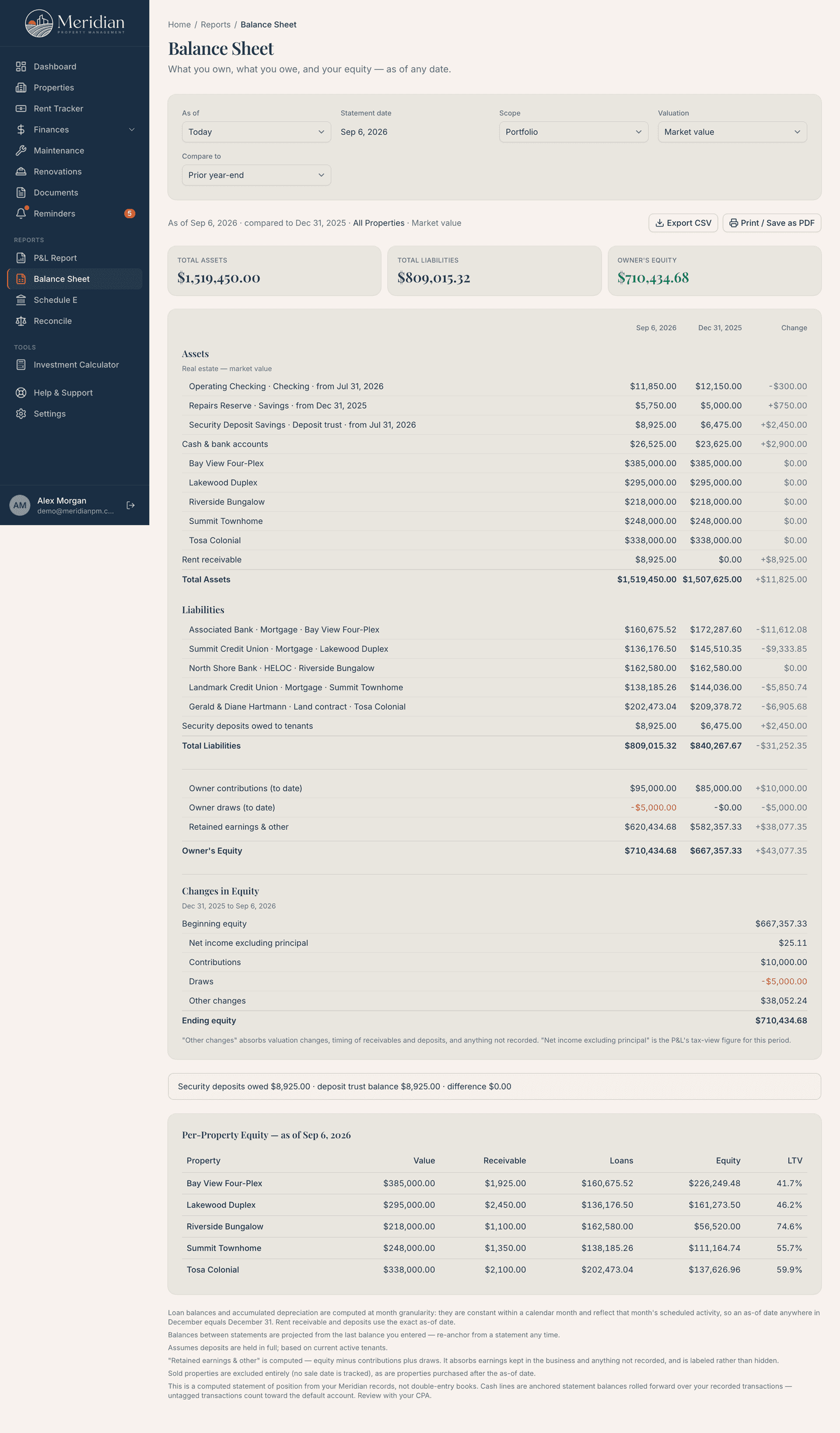
Balance sheet
What you own, what you owe, and your equity, as of any date you pick. Real estate at market or book value, cash, and rent receivable on one side; every loan balance and the deposits you're holding on the other. Enter your current balance from a statement and Meridian projects the rest — no payment history to reconstruct.
- Market value or book value, switched per statement
- Compare against prior month-end, year-end, or any date
- Per-property equity and LTV, plus CSV and print/PDF
P&L with a tax view
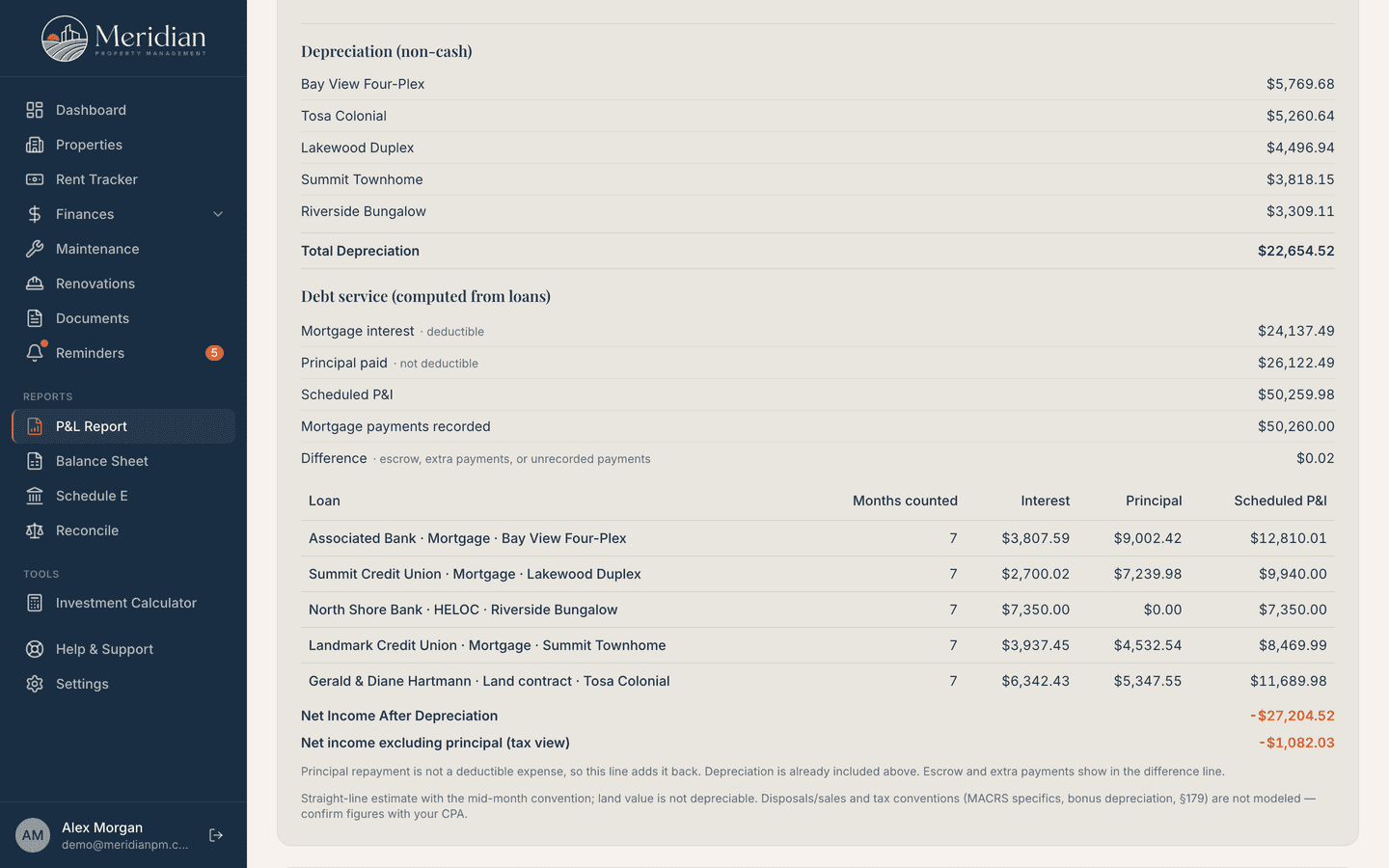
Your profit and loss, plus the two things a cash P&L can't tell you: straight-line depreciation per property, and debt service split into mortgage interest (deductible) and principal (not). Meridian also shows scheduled payments against what you actually recorded, so escrow and missed payments surface instead of hiding inside one “mortgage” number.
- Mortgage interest vs. principal, computed from your loans
- Depreciation per property, non-cash and clearly marked
- A closing “net income excluding principal” line for the tax view
Schedule E worksheet
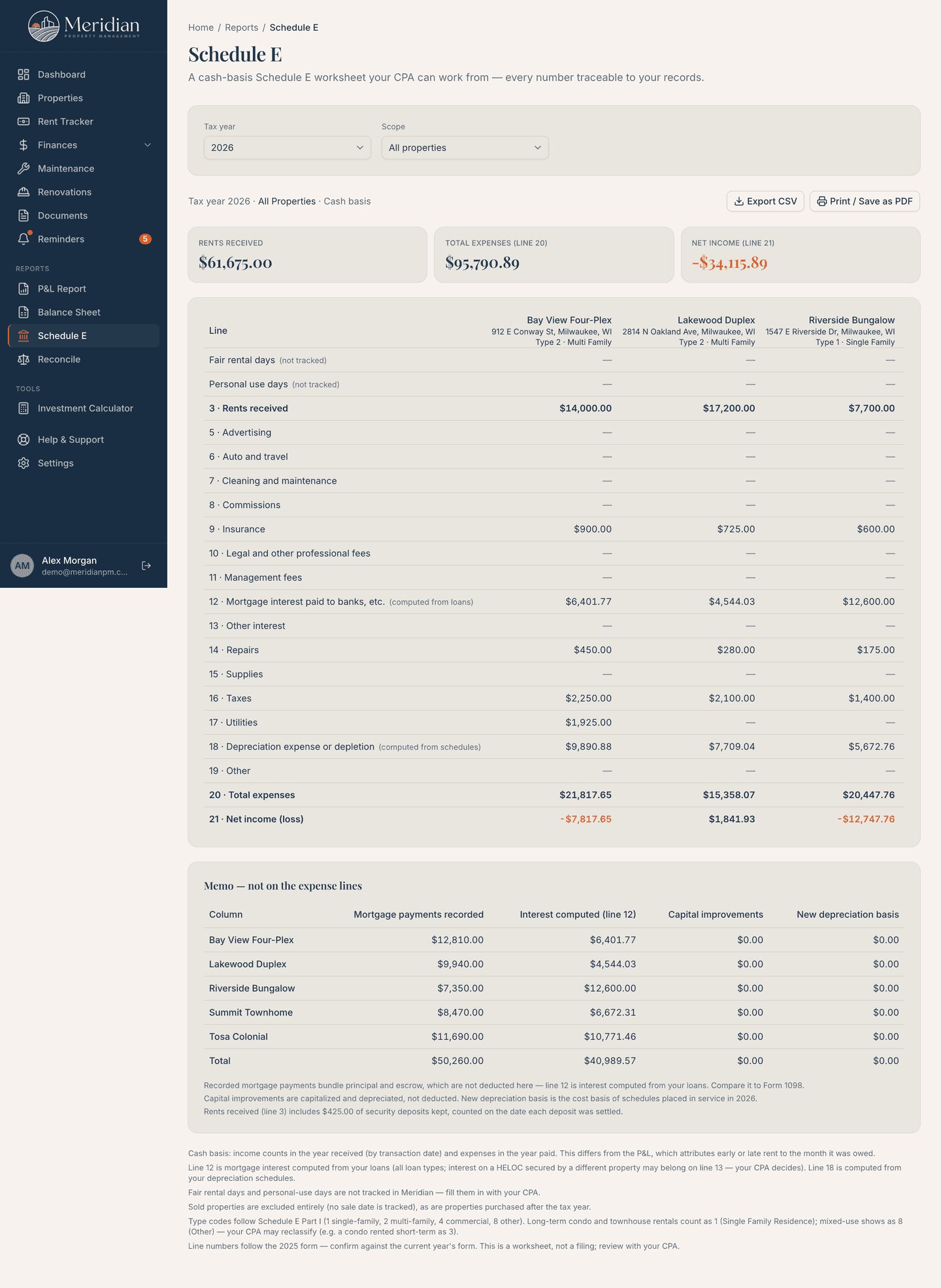
A cash-basis Schedule E Part I worksheet, one column per property, in the IRS's own line order. Your categories map to the right lines automatically, mortgage interest comes from your loans, and depreciation comes from your schedules. Export the CSV and hand it to your CPA.
- One column per property, laid out like the form
- Built-in categories auto-mapped; custom ones you assign
- Every assumption footnoted — a worksheet, not a filing
Owner contributions & draws
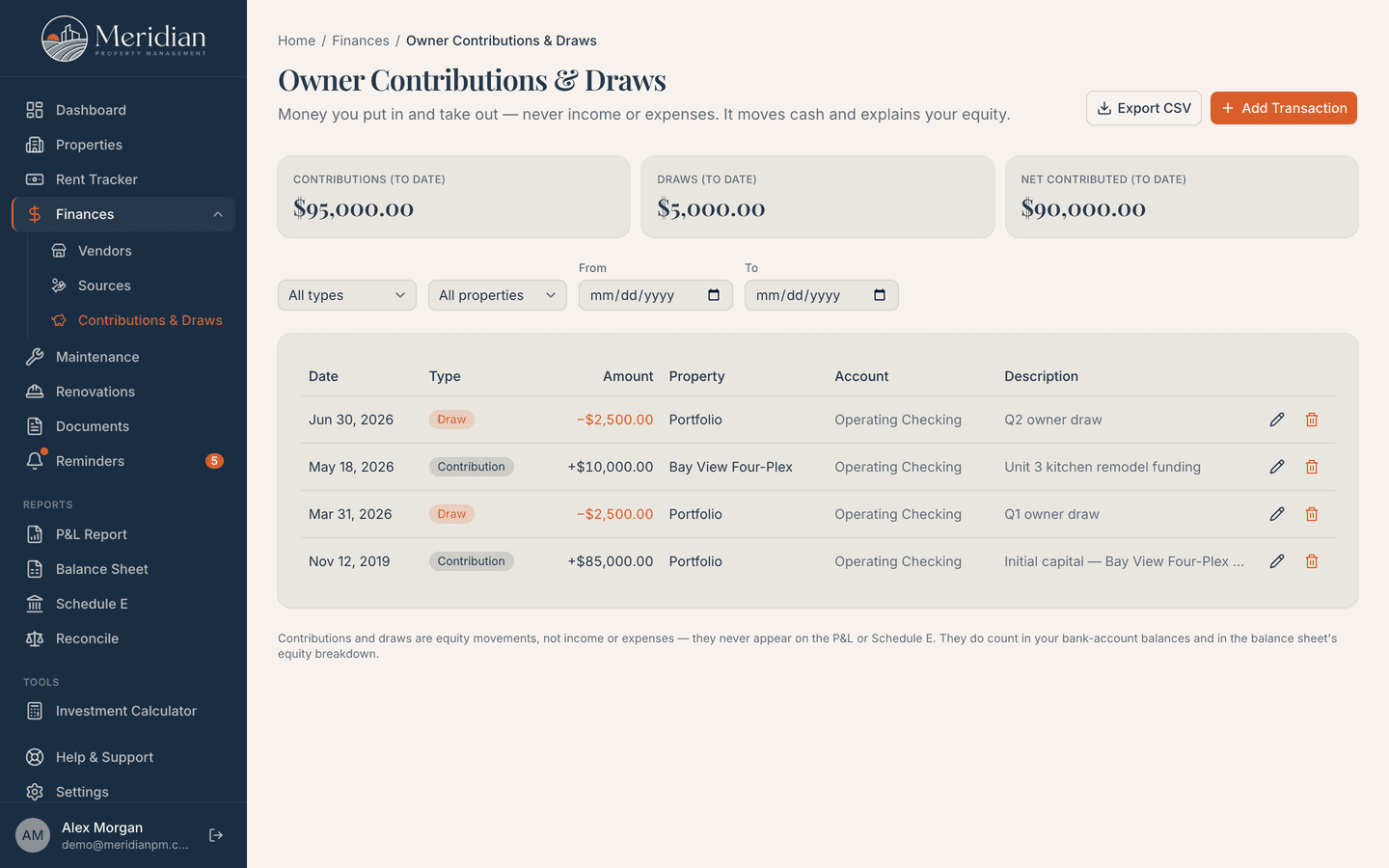
Money you put in and take out is its own record type — never income, never an expense. It moves your cash and explains your equity, and the balance sheet breaks equity into what you contributed, what you drew, and what the properties actually earned.
- Contributions and draws, per property or portfolio-wide
- A changes-in-equity roll-forward between any two dates
- Kept off the P&L and Schedule E by design
Seen enough?
Every plan includes every report on this page. Pick the one that matches your door count.
See plans and pricing14-day free trial on monthly plans for new customers · card required · auto-bills when the trial ends.
Cash & deposits
The two places money quietly goes missing
A cash balance you can't tie to a statement, and a deposit you can't prove you returned on time. Both get a paper trail.
Banking & cash
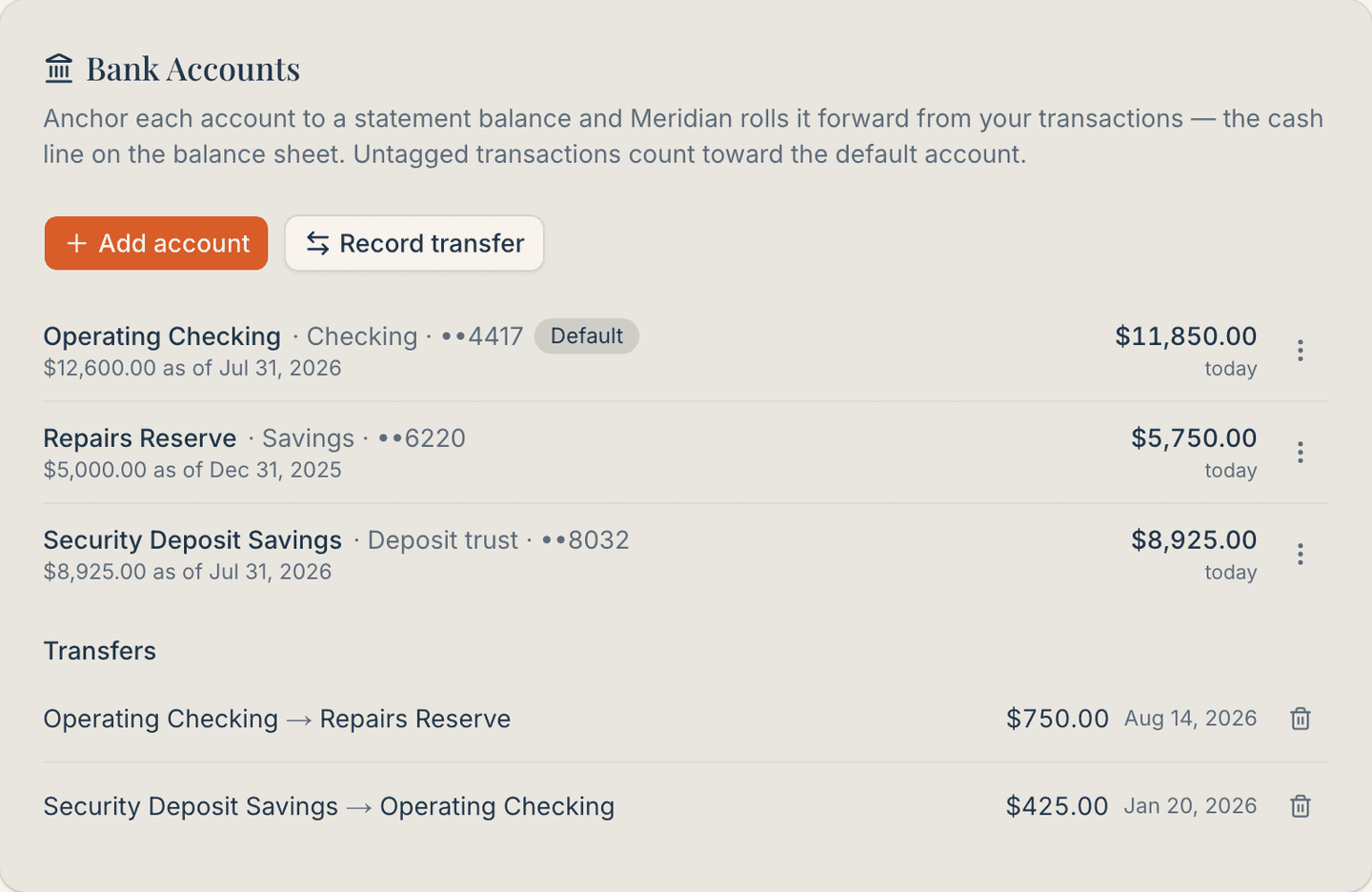
Anchor each account to a balance from your latest statement, and Meridian rolls it forward over the transactions you've already recorded. Finish a reconciliation and it re-anchors the account for you, so the cash line on your balance sheet stays honest instead of drifting.
- One statement anchor per account, re-anchored any time
- Transfers between your own accounts, kept off the P&L
- A deposit trust account, checked against what you owe tenants
Security deposits
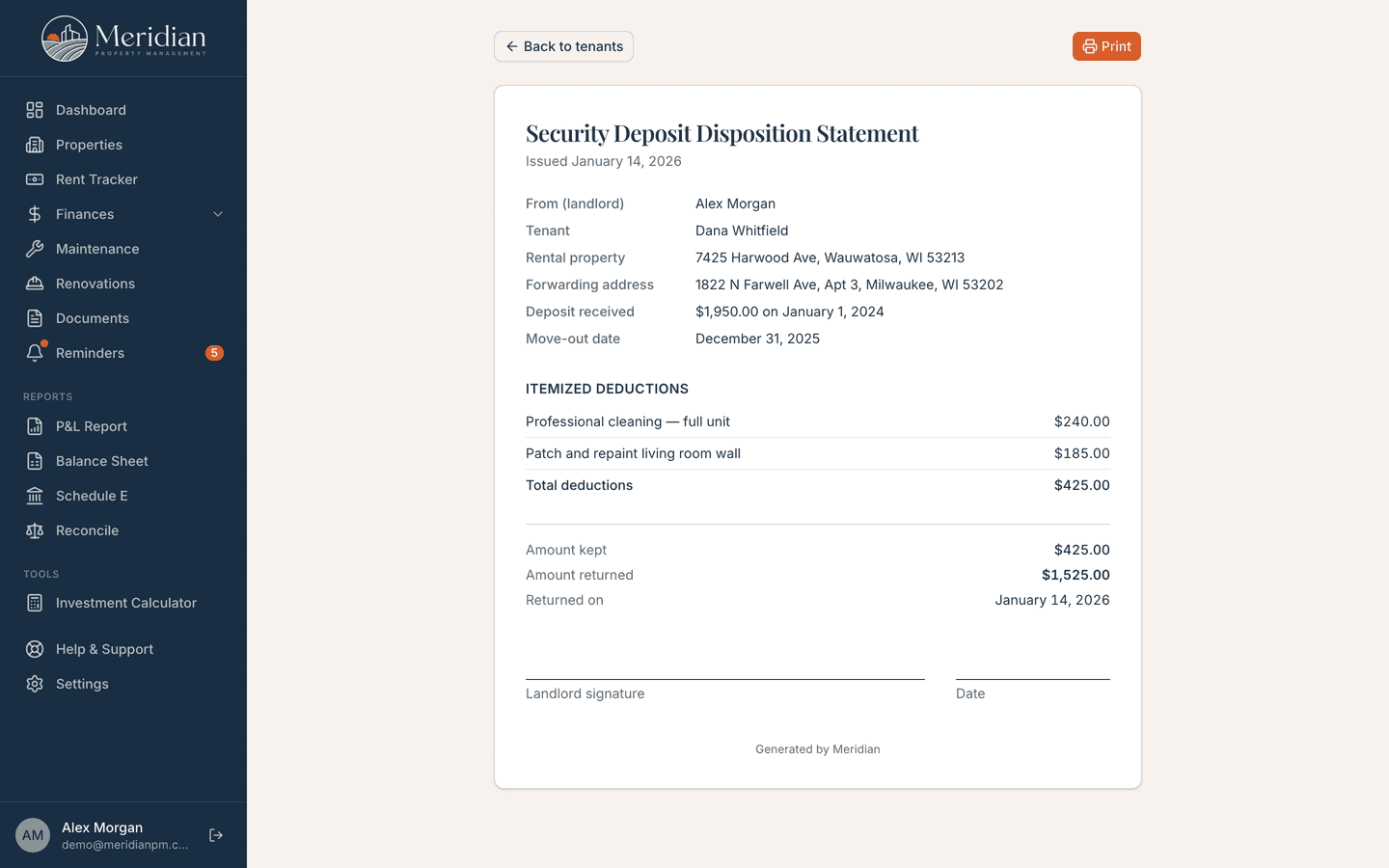
Track a deposit from the day it arrives to the day it's settled. Itemize your deductions and Meridian computes what's kept and what's returned, prints a disposition statement in your name, and reminds you before your state's return deadline runs out.
- Return-deadline reminders based on your state's rule
- Itemized, printable disposition statement for the tenant
- Held deposits show as a liability; kept amounts become income
Tenancies and collections
What a vacancy, a late payment and a shared bill cost you
Four things most owners carry in their heads. Meridian records them and does the arithmetic, from the same records as the reports above.
Turnover economics
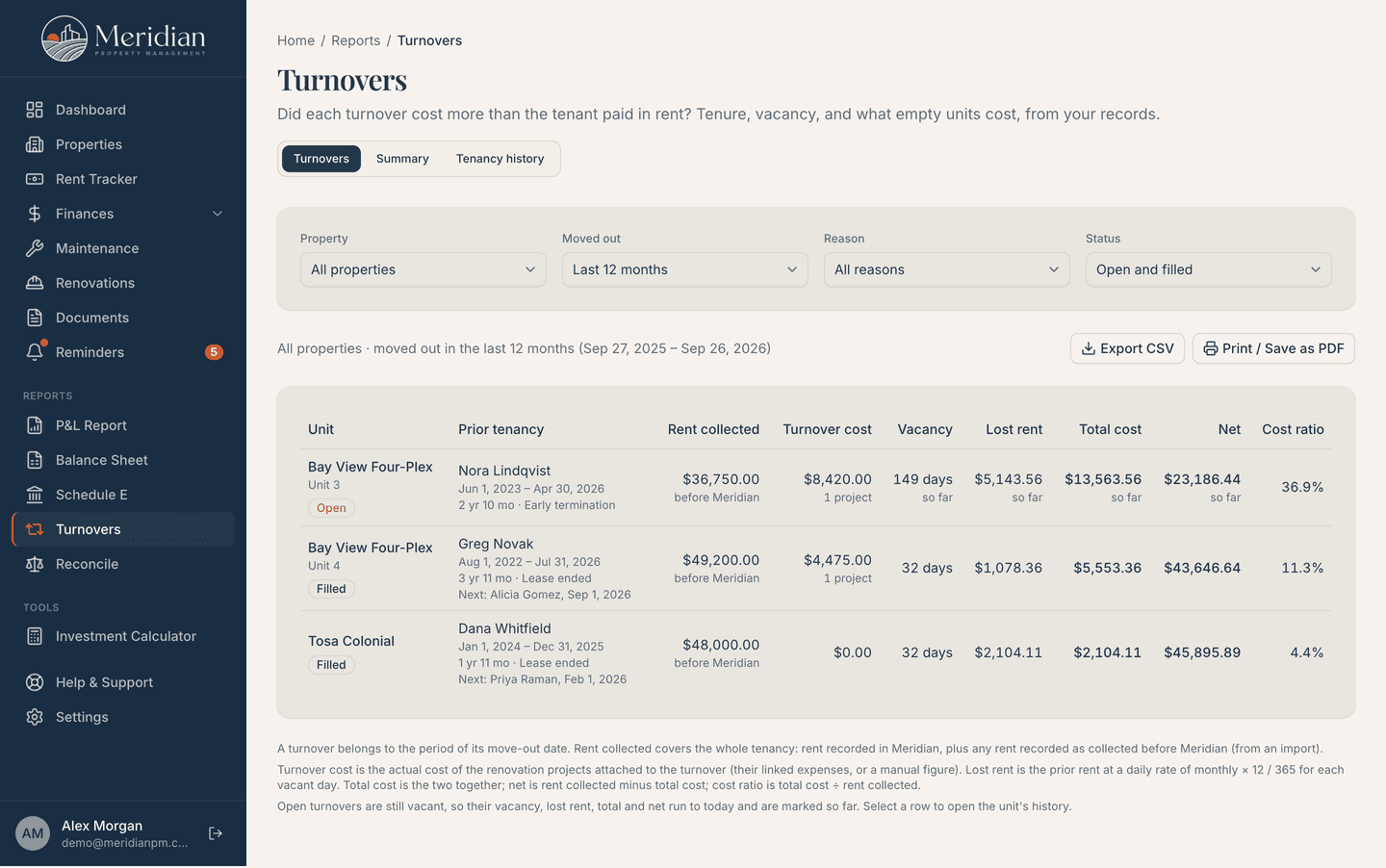
When a tenant moves out, Meridian opens a turnover for the unit and keeps counting until the next tenant moves in. Vacancy days, the rent lost at the old rent, and the renovation costs you link to it are set against everything that tenancy paid. One report shows which turnovers paid for themselves.
- Rent collected during the tenancy against turnover cost and lost rent
- Estimated against actual materials and labor, for each project
- Turnover rate, average vacancy and tenancy history, with CSV and print
Late fees
Set a policy once for the account, or one per property: a flat fee or a percent of the rent, a grace period, an optional daily fee and a cap. Meridian assesses it on overdue rent each day and shows it beside the month it belongs to. A fee counts as income on the day you collect it, not before.
- Flat or percent, grace days, a daily fee and a cap
- A warning when a policy passes your state's cap or grace period
- Collect, waive with a reason, or undo, from the rent tracker
Late notices and messages
A courtesy reminder goes to the tenant by email on the days late you choose, in wording you can edit. You can also write to one tenant or everyone at a property, or send an update from a maintenance ticket. Every message is logged, including the ones that were not sent and why.
- Your wording, filled in from your records with merge fields
- Replies go to you, and the log shows what was delivered or bounced
- Email, one way: courtesy reminders, not legal notices
Cost-recovery invoices
When you pay a bill that someone else owes part of, like gas on a shared meter, set the share once and Meridian builds the invoice for the month. The other party gets a link to a page they can open and print without an account. Record the payment and it lands as income.
- A standing split on a property, or expenses you pick by hand
- A hosted invoice page: no login, and no PDF to attach
- The expense stays whole, and the payment is its own income line
And the day-to-day that feeds it
The reports above aren't a separate module you maintain on the side. They're computed from this — the tracking you'd be doing anyway.
Portfolio dashboard
Income, expenses, net cash flow, and ROI across every property, with charts and the items needing attention this week.
Properties & tenants
Each property is its own command center. Tenant records carry lease dates, rent terms, deposits, and unit numbers.
Rent tracking
Expected vs. collected for every tenant, every month, with late, partial, and waived statuses. Records generate themselves.
Income & expenses
Categorized records with receipts attached, split across properties when a bill covers more than one, and CSV out.
Recurring expenses
Your mortgage, insurance, and HOA dues come back each period as a suggestion to accept, edit, or skip. Never retyped.
Import & reconciliation
Bring in CSV, OFX/QFX, or a PDF bank statement, then tick transactions off against it until the difference is zero.
Maintenance tracking
Every open item with its priority, vendor, and cost, from first report to completed, with labor and materials split out.
Renovation projects
Budget vs. actual with task checklists for every rehab and turn, and one click to capitalize the finished work.
Document storage
Leases, receipts, insurance, and warranties, organized by property and linked to the job or tenant they belong to.
Reminders & deadlines
Tax, insurance, lease renewal, and inspection dates grouped by urgency, with an optional email nudge before each one.
Team access
Bring in a co-owner, your accountant, or a maintenance contact, each seeing only their part. On the Portfolio plan.
14-day free trial on monthly plans for new customers · card required · auto-bills when the trial ends.
Cancel anytime during your trial from your account and you won't be charged.
Not ready? Try our free landlord tools — no account required.